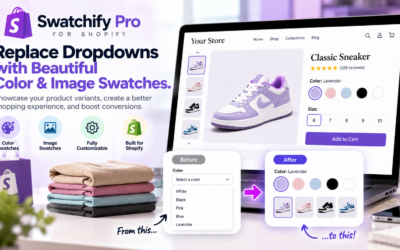
Shopify color and image swatches can transform how customers explore products, compare variations, and make purchasing decisions. Instead of relying on traditional dropdown menus, shoppers can see available colors, styles, and product variations directly on your storefront.
However, creating an attractive shopping experience requires more than displaying a few colored circles.
Modern Shopify stores need flexible product presentation, intuitive navigation, responsive layouts, and convenient purchasing options.
That’s where Swatchify Pro comes in.
Swatchify Pro is a Shopify application designed to replace traditional variant dropdowns with interactive color and image swatches. Additionally, it offers advanced customization, collection-page swatches, product linking, multilingual capabilities, and other storefront enhancements.
As a result, Shopify merchants can create a more visual, professional, and convenient shopping experience.
What Are Shopify Color and Image Swatches?
Shopify color and image swatches are visual selectors that allow customers to choose product variations without relying entirely on text-based dropdown menus.
For example, imagine an online clothing store selling a shirt in black, white, blue, and red.
With traditional dropdowns, customers must open a menu and read the available color names.
However, with color swatches, shoppers can immediately see the available colors and select their preferred option.
Similarly, image swatches can display actual product photographs or visual representations of different styles.
Consequently, customers can understand product variations more quickly.
Why Shopify Stores Need Better Product Variant Displays
Product presentation plays an important role in the online shopping experience.
When customers cannot easily distinguish between variations, they may spend additional time searching for the correct product.
Furthermore, confusing product options can create unnecessary friction during shopping.
Visual swatches help address these challenges by making product choices easier to understand.
For example, a customer shopping for shoes can compare available colors visually instead of repeatedly opening a dropdown menu.
Likewise, a customer shopping for furniture can explore different finishes and materials through image swatches.
Therefore, Shopify variant swatches can improve product navigation while giving storefronts a more polished appearance.
Swatchify Pro Feature #1: Beautiful Shopify Color Swatches
One of Swatchify Pro’s core features is its customizable color swatch functionality.
Instead of displaying color names only, merchants can show visual color selections directly on their Shopify product pages.
For example, customers can choose between red, blue, green, black, and other available product colors using interactive swatches.
Additionally, merchants can customize how those swatches appear.
Customizable Color Swatch Appearance
Swatchify Pro provides styling options that allow merchants to match swatches with their storefront branding.
For example, merchants can customize:
- Swatch sizes
- Swatch shapes
- Visual styling
- Product-page presentation
- Collection-page appearance on supported plans
As a result, merchants can create product selectors that complement their existing Shopify theme.
Round and Square Shopify Swatches
Different storefront designs require different visual styles.
For example, a luxury fashion boutique may prefer small circular swatches, while a modern electronics retailer may prefer square selectors.
Fortunately, Swatchify Pro supports customizable swatch shapes and sizes.
Therefore, businesses can tailor their product variation displays to their branding preferences.
Swatchify Pro Feature #2: Shopify Image Swatches
While color swatches work well for simple color variations, some products require more detailed visual selections.
For example, a furniture store may offer several fabric patterns. Similarly, a fashion retailer may sell products with different prints or designs.
In these situations, image swatches can provide a clearer representation of the available choices.
Swatchify Pro allows merchants to display product images as interactive variant selectors.
Consequently, customers can compare different product appearances without relying solely on written descriptions.
Show Actual Product Variations
Image swatches can display visual representations of product options.
For example, a handbag available in several styles can use image swatches to show those differences.
Likewise, a home decor store can display different patterns or finishes.
As a result, customers can make more informed product selections.
Swatchify Pro Feature #3: Dynamic Variant Image Switching
Another important Swatchify Pro feature is dynamic variant image switching.
When a customer selects a different product variation, the displayed product image can automatically update to reflect that selection.
For example, imagine a customer viewing a jacket in black.
When the customer selects the blue swatch, the product image changes to display the blue jacket.
Similarly, selecting another available variation updates the visual presentation.
Therefore, customers can see the product variation they are considering without unnecessary navigation.
Why Dynamic Product Images Matter
Customers often want to know exactly what a selected product variation looks like.
However, static images may not clearly represent every available option.
Dynamic image switching helps connect the selected variation with the corresponding product image.
As a result, product pages become more interactive and easier to navigate.
Swatchify Pro Feature #4: Collection Page Swatches
Many Shopify swatch solutions focus primarily on individual product pages.
However, customers frequently begin shopping on collection pages.
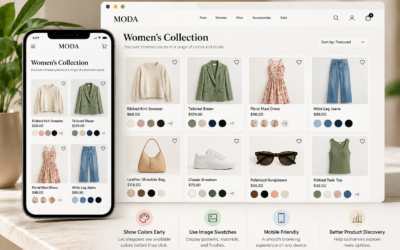
For example, a shopper browsing a collection of dresses may want to see available colors before opening a specific product.
Swatchify Pro supports collection-page swatches on eligible plans.
Therefore, customers can explore available product variations while browsing collections.
Improve Shopify Collection Browsing
Collection-page swatches make product variations more visible during browsing.
For example, a customer may discover that a product displayed in black is also available in white or blue.
Additionally, merchants can customize collection swatch presentation on supported plans.
Consequently, collection pages can become more informative and visually engaging.
Swatchify Pro Feature #5: Advanced Swatch Layouts
Different products and storefronts benefit from different swatch arrangements.
For example, a product with three available colors may only need a simple row of swatches.
However, a product with many variations may benefit from a more advanced layout.
Swatchify Pro’s Enterprise plan includes advanced layout options such as sliders and carousels.
Slider and Carousel Swatch Layouts
Slider and carousel layouts help organize multiple product variations within a defined space.
For example, a retailer with numerous color or style options can present them through an interactive arrangement.
As a result, product pages can remain organized even when several variations are available.
Visual Effects and Animations
Swatchify Pro also offers visual effects and animations on its Enterprise plan.
These enhancements can make swatch interactions feel more responsive and visually appealing.
However, merchants should select effects that complement their storefront rather than distract customers.
Swatchify Pro Feature #6: Cross-Product Linking
Not every product variation exists within a single Shopify product listing.
For example, a merchant may create separate product listings for different colors, materials, or styles.
In these situations, customers may need an easier way to move between related products.
Swatchify Pro includes cross-product linking on its Enterprise plan.
This feature allows merchants to connect related products through visual swatch selections.
Connect Related Shopify Products
For example, imagine a store selling the same handbag design in several separately listed colors.
Instead of requiring customers to search for each color individually, linked product swatches can help them navigate between the related listings.
Consequently, merchants can create a more connected shopping experience.
Swatchify Pro Feature #7: Sticky Add-to-Cart Functionality
Making product selection easier is important. However, customers also need a convenient way to complete their purchases.
Swatchify Pro includes sticky add-to-cart functionality.
This feature keeps purchasing controls accessible while customers explore product information.
Additionally, the Shopify listing describes real-time inventory and price displays associated with the sticky add-to-cart feature.
Keep Purchasing Options Convenient
For example, a customer may scroll through product photographs, descriptions, and other information.
Instead of returning to the top of the page, a sticky add-to-cart interface can keep the purchasing action accessible.
Therefore, shoppers can move more conveniently from product exploration to checkout.
Swatchify Pro Feature #8: Inventory-Aware Product Swatches
Inventory availability is another important part of product selection.
Customers should be able to understand whether their preferred variation is available.
Swatchify Pro’s website describes inventory-aware swatches, while its Shopify listing includes stock availability and inventory display capabilities.
Depending on configuration, merchants can use inventory-related display options to help customers understand product availability.
As a result, shoppers can make selections with clearer information about available variations.
Swatchify Pro Feature #9: Tooltips and Custom Swatch Labels
Some product variations require more explanation than a color or image alone can provide.
For example, a customer may want to know the name of a particular color, fabric, or product style.
Swatchify Pro’s Pro plan includes tooltip information displays and custom swatch labels.
Helpful Swatch Tooltips
Tooltips can provide additional information about a product variation.
For example, a customer exploring several similar shades may benefit from seeing their individual color names.
Therefore, tooltips can improve clarity without requiring lengthy descriptions beside every swatch.
Custom Variant Labels
Custom labels give merchants another way to identify product variations.
For example, labels can help distinguish different styles or finishes.
As a result, customers can better understand the options available to them.
Swatchify Pro Feature #10: Multi-Language Support
Many Shopify businesses serve customers in multiple countries.
Therefore, providing a shopping experience that supports different languages can be valuable.
Swatchify Pro’s Enterprise plan includes multilingual support.
According to its Shopify App Store listing, the application supports automatic language detection across more than 40 languages.
Supported languages include English, Spanish, French, German, Italian, Portuguese, Japanese, Korean, Chinese, Arabic, Hindi, and many others.
As a result, international merchants can provide a more accessible product-selection experience.
Swatchify Pro Feature #11: Custom CSS Styling
Every Shopify store has its own branding and design requirements.
While built-in customization options work for many merchants, some businesses want additional styling control.
Swatchify Pro’s Enterprise plan includes custom CSS injection.
Therefore, merchants with appropriate technical knowledge can apply additional styling to supported storefront elements.
For example, custom CSS may help align visual elements with a store’s existing design system.
However, merchants should test custom styling carefully to avoid unintended display issues.
Swatchify Pro Feature #12: Quick View and Additional Product Options
Swatchify Pro also offers additional storefront capabilities on its Enterprise plan.
For example, the Shopify listing includes a quick view modal and customer file uploads.
Quick View Modal
A quick view modal allows customers to explore product information through an additional storefront interface.
Consequently, shoppers may be able to review product details without following the traditional product-page navigation process.
Customer File Uploads
Some merchants sell products that require customer-provided files.
For example, personalized merchandise may require artwork or another customer-supplied asset.
Swatchify Pro’s Enterprise plan lists customer file uploads among its available features.
Therefore, merchants offering suitable personalized products may find this capability useful.
Mobile-Responsive Shopify Product Swatches
Mobile shopping is an important consideration for ecommerce stores.
However, product selectors that look attractive on desktop computers must also work on smaller screens.
Swatchify Pro includes mobile-responsive swatch designs.
As a result, merchants can provide visual product selections across different screen sizes.
Additionally, merchants should test their storefront on mobile devices to confirm that their chosen layout works well with their theme.
Easy Shopify Swatch Installation Without Coding
Store owners should not need extensive development experience to improve their product presentation.
Fortunately, Swatchify Pro offers straightforward Shopify installation and setup.
The Basic plan includes easy setup without coding.
After installing the application, merchants can configure supported swatch options and customize their appearance.
For additional details, explore the Swatchify Pro features page.
Swatchify Pro Pricing and Available Plans
Swatchify Pro offers multiple subscription options for businesses with different needs.
Therefore, merchants can choose a plan based on their product catalog and desired functionality.
Free Plan
The free plan supports up to 10 products and includes basic color and image swatches, product-page swatches, customizable sizes and shapes, and mobile-responsive design.
As a result, smaller merchants can explore the application’s core functionality before upgrading.
Basic Plan
The Basic plan costs $7.99 per month according to the Shopify App Store listing.
It includes color and image swatches, product-page functionality, mobile-responsive design, easy setup, and email support.
Additionally, the listing advertises a seven-day free trial.
Pro Plan
The Pro plan costs $11.99 per month according to the Shopify listing.
In addition to Basic features, it includes collection-page swatches, collection customization, tooltips, custom labels, priority email support, and live chat support.
Therefore, this plan may appeal to growing stores that want additional product presentation options.
Enterprise Plan
The Enterprise plan costs $19.99 per month according to the Shopify listing.
It includes Pro features plus advanced layouts, visual effects, custom CSS, multilingual support, quick view functionality, cross-product linking, and customer file uploads.
As a result, merchants requiring more extensive customization may prefer this plan.
For additional information, visit the Swatchify Pro pricing page.
Which Shopify Stores Can Benefit From Swatchify Pro?
Swatchify Pro can benefit many ecommerce businesses that sell products with multiple variations.
Fashion and Clothing Stores
Clothing retailers frequently offer products in different colors, patterns, and styles.
Therefore, visual swatches can help shoppers compare available options.
Beauty and Cosmetics Stores
Beauty retailers often sell products with different shades or finishes.
For example, makeup stores may offer multiple foundation or lipstick colors.
Consequently, color swatches can make product selections easier to understand.
Furniture and Home Decor Stores
Furniture and home decor products may be available in different fabrics, finishes, or patterns.
Therefore, image swatches can provide useful visual comparisons.
Electronics and Accessories Stores
Electronics retailers may offer products in multiple colors or designs.
Similarly, accessories such as phone cases and headphones often have several visual variations.
As a result, interactive swatches can improve product browsing.
Jewelry and Specialty Retailers
Jewelry products may be available in different metal colors or finishes.
For example, customers may want to compare gold, silver, and rose gold options.
Therefore, visual swatches can make those differences easier to identify.
How Shopify Color and Image Swatches Can Support Conversions
Improving the shopping experience is an important part of ecommerce optimization.
However, no individual storefront feature guarantees higher conversion rates.
Instead, merchants should focus on reducing confusion and making product selection more convenient.
Shopify color and image swatches can support this objective by presenting product variations visually.
Furthermore, dynamic images, collection-page swatches, and accessible purchasing controls can make product exploration more intuitive.
Ultimately, merchants should evaluate their own store performance to determine how these improvements affect customer behavior.
Shopify Color and Image Swatches: Frequently Asked Questions
What Is Swatchify Pro?
Swatchify Pro is a Shopify application that replaces traditional variant dropdowns with interactive color and image swatches.
Does Swatchify Pro Support Image Swatches?
Yes. Swatchify Pro supports image swatches that display visual representations of product variations.
Can Swatchify Pro Change Product Images Automatically?
Yes. Its dynamic variant image switching feature can update displayed product images when customers select different variations.
Does Swatchify Pro Work on Collection Pages?
Yes. Collection-page swatches are available on supported subscription plans.
Can I Customize Swatch Shapes and Sizes?
Yes. Swatchify Pro provides customizable swatch sizes, shapes, and styling options.
Does Swatchify Pro Include Sticky Add to Cart?
Yes. The application lists sticky add-to-cart functionality among its features.
Does Swatchify Pro Support Multiple Languages?
Yes. Its Enterprise plan includes multilingual functionality, with the Shopify listing describing support for more than 40 languages.
Can I Link Separate Products With Swatches?
Yes. Cross-product linking is available on the Enterprise plan.
Is There a Free Swatchify Pro Plan?
Yes. The Shopify listing includes a free plan supporting up to 10 products.
Where Can I Download Swatchify Pro?
You can install Swatchify Pro directly through its official Shopify App Store listing.
Download Swatchify Pro and Transform Your Shopify Store
Your Shopify product pages should make shopping simple, attractive, and convenient.
However, traditional dropdown menus may not provide the visual experience your customers expect.
Swatchify Pro offers a flexible alternative with customizable color swatches, image swatches, dynamic product images, collection-page displays, and advanced storefront features.
Additionally, its higher-tier plans provide advanced layouts, cross-product linking, multilingual support, custom styling, and other capabilities.
As a result, merchants can create more engaging product pages while maintaining control over their storefront appearance.
Ready to upgrade your Shopify product pages?
Download and Install Swatchify Pro From the Shopify App Store
Start with the plan that fits your business and give customers a more visual way to explore your products.


0 Comments