However, not all Shopify swatch apps provide the same features. Some focus exclusively on basic color selection, while others support image swatches, collection page displays, custom layouts, and additional shopping tools.
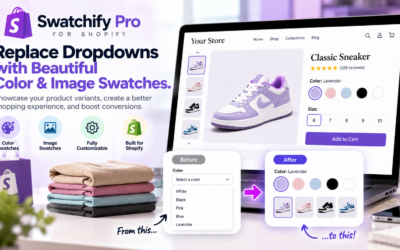
Swatchify Pro is a Shopify product variant app designed to replace traditional dropdowns with interactive color and image swatches. It also offers advanced customization options to help merchants create a more visually engaging storefront.
In this guide, we explain how Shopify product variant swatches work, why they matter, and how Swatchify Pro can help store owners improve product selection and navigation.
What Are Shopify Product Variant Swatches?
Shopify product variant swatches are visual selectors that allow customers to choose between available product options. Instead of opening a dropdown menu containing text labels, shoppers can click a color sample, product image, or other visual representation.
For example, a clothing store selling a shirt in black, white, blue, and red can display four color swatches directly beneath the product information. Customers can then select their preferred option without searching through a dropdown menu.
Similarly, a furniture retailer may use image swatches to display different upholstery patterns or finishes.
Common Types of Shopify Variant Selectors
- Color swatches for available product colors
- Image swatches for patterns, finishes, and styles
- Text-based selectors for sizes and other attributes
- Custom layouts for displaying product variations
- Visual options on product and collection pages
Although Shopify themes may provide some built-in variant selection features, a dedicated Shopify swatch app can offer additional customization and presentation options.
Why Shopify Color Swatches Are Better Than Traditional Dropdowns for Visual Options
Traditional variant dropdowns can work well for simple selections. However, they may be less intuitive when shoppers need to compare visual differences between products.
For example, selecting between “Ocean Blue,” “Midnight Blue,” and “Sky Blue” from a text menu requires customers to imagine how each option looks.
In contrast, Shopify color swatches can display the available colors directly on the product page.
Benefits of Visual Product Selection
- Helps customers identify available colors quickly.
- Reduces reliance on descriptive text labels.
- Makes product variations easier to compare.
- Creates a more visually organized product page.
- Supports intuitive selection on mobile devices.
- Can encourage shoppers to explore additional options.
Nevertheless, dropdown menus remain useful for certain attributes, especially when options cannot be represented clearly through images or colors.
The best product variant interface should match the type of product and the information customers need to make a decision.
Shopify Image Swatches: Show Customers Exactly What They Are Selecting
Shopify image swatches allow merchants to represent product options using actual photographs or visual previews.
Unlike basic color circles, image swatches can communicate details such as patterns, textures, finishes, and designs.
For example, a furniture store might display different fabric patterns as miniature images. Meanwhile, a jewelry retailer could use photographs to show alternative finishes or gemstone colors.
When Should You Use Image Swatches?
- Clothing with multiple patterns
- Furniture with different materials
- Home decor with alternative finishes
- Accessories with distinct designs
- Beauty products with visually different shades
- Products requiring more detail than a solid color
Additionally, high-quality variant images can help customers distinguish between similar options.
Swatchify Pro supports custom color and image swatches, allowing merchants to choose visual selectors that better represent their merchandise.
Dynamic Variant Image Switching Improves Product Visualization
One useful feature of Shopify product variant swatches is the ability to update product images when a shopper selects a different option.
For instance, imagine a customer viewing a jacket available in black, green, and beige.
When the shopper selects the green swatch, the displayed product image can change to show the green jacket.
This functionality helps connect the selected option with its visual appearance.
Benefits of Dynamic Product Images
- Provides a clearer view of selected variants.
- Helps shoppers compare available options.
- Reduces confusion between product colors.
- Creates a more interactive product page.
- Supports more informed purchase decisions.
Swatchify Pro’s website describes dynamic variant image switching as part of its product presentation features.
For merchants offering visually distinct variations, this functionality can be particularly valuable.
Display Shopify Product Swatches on Collection Pages
Product pages are not the only places where visual swatches can improve navigation.
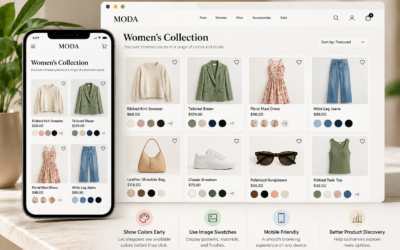
Shopify collection page swatches allow customers to view available product options while browsing multiple items.
For example, someone shopping for clothing may want to see which colors are available before opening an individual product page.
By displaying swatches within collection listings, merchants can provide additional product information earlier in the shopping journey.
Advantages of Collection Page Swatches
- Displays available colors during product browsing.
- Helps shoppers compare variations across products.
- Provides additional visual information in collections.
- Can reduce unnecessary navigation between pages.
- Creates a more interactive shopping experience.
Swatchify Pro includes collection page swatches in its higher-tier feature offerings, giving merchants additional control over product presentation.
Customize Shopify Swatches to Match Your Brand
Every ecommerce business has its own visual identity. Therefore, product variant selectors should complement the overall design of the storefront.
Swatchify Pro offers customizable swatch sizes, shapes, layouts, and styling options.
For example, a minimalist clothing brand may prefer small circular color swatches. In contrast, a furniture retailer might choose larger image previews to showcase material details.
Shopify Swatch Customization Options
- Custom color swatches
- Image-based product selectors
- Adjustable swatch sizes
- Different swatch shapes
- Custom labels and tooltips
- Advanced slider and carousel layouts
- Visual effects and animations
- Custom CSS styling options
Additionally, consistent styling can make product options feel like a natural part of the website rather than a separate interface element.
Cross-Product Linking Makes Related Products Easier to Discover
Some ecommerce merchants create separate product listings for different colors, designs, or product families.
For example, a clothing brand might list individual jacket colors as separate products rather than combining every option into a single product listing.
In these situations, cross-product linking can help shoppers navigate between related items.
Swatchify Pro includes cross-product linking in its advanced feature offerings.
How Cross-Product Linking Helps Shopify Stores
- Connects related product listings.
- Helps shoppers discover alternative colors or designs.
- Improves navigation between related merchandise.
- Supports more organized product exploration.
However, merchants should maintain clear product information and avoid linking unrelated items simply to increase navigation.
Sticky Add to Cart Helps Keep Purchasing Options Accessible
A sticky add-to-cart interface keeps a purchasing action accessible as shoppers navigate a product page.
For stores with lengthy descriptions, multiple product images, or detailed specifications, customers may otherwise need to scroll back to the top before adding an item to their cart.
Swatchify Pro’s Shopify listing describes sticky add-to-cart functionality with real-time inventory and pricing information.
Potential Benefits of Sticky Add to Cart
- Keeps purchase actions more accessible.
- Reduces unnecessary scrolling.
- Supports mobile shopping convenience.
- Helps display relevant price and inventory information.
- Creates a more streamlined product browsing experience.
Nevertheless, sticky interface elements should be implemented carefully so they do not obstruct important content on smaller screens.
Quick View and Advanced Layouts for Shopify Collections
Quick view functionality can allow shoppers to inspect product information without navigating through the full product page.
Additionally, advanced swatch layouts such as sliders and carousels can help organize large numbers of product options.
These features may be particularly useful for merchants with extensive catalogs or products offering numerous variations.
Examples of Advanced Product Display Features
- Collection page quick view
- Swatch sliders and carousels
- Custom tooltip information
- Visual animations
- Cross-product navigation
- Additional product customization options
Swatchify Pro offers several of these capabilities through its advanced plans.
Mobile-Friendly Shopify Product Variant Swatches
Mobile usability is an important consideration for ecommerce websites.
On smaller screens, complicated dropdowns and crowded product controls can make shopping more difficult.
Therefore, Shopify product variant swatches should be easy to see, tap, and understand on smartphones and tablets.
Mobile Swatch Design Best Practices
- Use appropriately sized selection targets.
- Maintain adequate spacing between swatches.
- Clearly indicate the selected option.
- Keep important product information visible.
- Ensure color options also have accessible labels.
- Test the interface across different screen sizes.
Swatchify Pro provides mobile-responsive swatch designs, helping merchants present product variations across different devices.
Multilingual Shopify Swatches for International Stores
International ecommerce stores often need to present product information to customers who speak different languages.
Swatchify Pro’s advanced functionality includes multilingual support with automatic language detection across more than 40 languages.
For example, merchants serving customers in English-, Spanish-, French-, or German-speaking markets may benefit from product interfaces that support multiple languages.
However, merchants should verify that their complete storefront, including product descriptions, checkout information, and customer communications, provides an appropriate experience for their intended markets.
Which Shopify Stores Benefit Most From Product Variant Swatches?
Although visual swatches can be useful across many industries, they are especially relevant when product appearance influences purchasing decisions.
| Store Type | Useful Swatch Options |
|---|---|
| Fashion and Apparel | Colors, patterns, and styles |
| Furniture | Fabrics, finishes, and materials |
| Beauty and Cosmetics | Shades and color variations |
| Jewelry | Metal finishes and gemstones |
| Home Decor | Patterns, colors, and textures |
| Accessories | Designs, colors, and finishes |
Ultimately, the most effective swatch design depends on the product catalog and the information customers need when comparing options.
How to Choose the Best Shopify Swatch App
When comparing Shopify color swatch apps, merchants should consider more than appearance alone.
A suitable app should offer the features required by the store while remaining manageable for the business owner.
Important Features to Compare
- Support for color and image swatches
- Product page compatibility
- Collection page swatch options
- Custom styling and layouts
- Mobile-responsive design
- Cross-product linking
- Pricing and inventory display
- Multilingual capabilities
- Theme compatibility
- Available support and pricing plans
Additionally, merchants should test how an app behaves with their specific Shopify theme and product catalog before fully deploying it.
For general guidance about managing product variations, review Shopify’s official product variant documentation.
How to Add Color and Image Swatches to Shopify With Swatchify Pro
Adding Shopify product variant swatches generally involves installing a compatible app, configuring its settings, and testing the product selection experience.
Step 1: Install Swatchify Pro
Visit the Swatchify Pro Shopify App Store listing and review the available plans and features.
Step 2: Review Your Product Variants
Check that your Shopify products have clearly organized options and appropriate images for the variations you want to display.
Step 3: Configure Swatch Appearance
Choose appropriate color or image swatches, then customize their size, shape, and appearance to complement your storefront.
Step 4: Enable the Features Available in Your Plan
Depending on your subscription, configure product page swatches, collection page displays, advanced layouts, or other available features.
Step 5: Test Your Storefront
Before relying on the new interface, verify that customers can select the correct variants and that product images, pricing, inventory information, and add-to-cart behavior function as expected.
Additionally, test both desktop and mobile layouts to identify any usability issues.
Can Shopify Product Variant Swatches Improve Conversion Rates?
Shopify product variant swatches can make product selection clearer and more convenient. However, improved usability does not automatically guarantee higher conversion rates.
Actual results depend on factors such as product quality, pricing, traffic sources, website design, and customer expectations.
For example, a store with confusing color selection may benefit from clearer swatches. Meanwhile, another store may find that shipping costs or product descriptions have a greater influence on purchasing decisions.
How to Measure Swatch Performance
- Monitor product page conversion rates.
- Compare add-to-cart behavior.
- Review product variant selection patterns.
- Observe customer support questions.
- Evaluate mobile shopping behavior.
- Test interface changes when sufficient data is available.
For additional context, merchants can review Shopify’s reporting and analytics documentation.
Ultimately, conversion improvements should be evaluated through actual store performance rather than assumed from appearance alone.
Frequently Asked Questions About Shopify Product Variant Swatches
What are Shopify product variant swatches?
Shopify product variant swatches are visual selectors that display available product options through colors, images, or other interactive elements instead of relying exclusively on dropdown menus.
How do I add color swatches to Shopify?
You can use supported theme functionality or install a Shopify swatch app such as Swatchify Pro. After installation, configure your product options and swatch appearance, then test the customer selection experience.
What is the difference between Shopify color swatches and image swatches?
Color swatches display color samples, while image swatches use photographs or visual previews. Image swatches are especially useful for patterns, textures, and product variations that cannot be represented accurately by a single color.
Can I display Shopify swatches on collection pages?
Yes. Some Shopify swatch apps, including eligible Swatchify Pro plans, support collection page swatches so customers can view product options while browsing collections.
Does Swatchify Pro support mobile devices?
Yes. Swatchify Pro includes mobile-responsive swatch designs intended to provide a usable product selection experience across screen sizes.
Can Swatchify Pro link related products?
Yes. Its advanced feature offerings include cross-product linking, which can help shoppers navigate between related product listings.
Does Swatchify Pro offer multilingual support?
Yes. Its advanced features include multilingual support with automatic detection across more than 40 languages.
Is Swatchify Pro free?
Swatchify Pro offers a free plan with limited product coverage, along with paid plans providing additional functionality. Visit the official Shopify App Store listing for current pricing and feature availability.
Will adding product swatches increase my Shopify sales?
Visual swatches can improve product selection and usability, but sales increases are not guaranteed. Merchants should evaluate conversion rates, add-to-cart behavior, and other performance indicators after implementation.
Upgrade Your Shopify Store With Swatchify Pro
Shopify product variant swatches can transform the way customers explore colors, patterns, styles, and other product options. By replacing traditional dropdown menus with interactive visual selectors, merchants can create a clearer and more engaging product browsing experience.
Swatchify Pro provides Shopify color swatches, image swatches, customizable styling, dynamic variant image switching, and additional advanced features for merchants seeking greater control over their storefront presentation.
Whether you operate a fashion boutique, furniture store, beauty brand, or other ecommerce business, visual product selection can help customers explore available options with greater confidence.
Learn more about Swatchify Pro’s Shopify swatch features and discover how the app can enhance your product pages.
Ready to replace traditional Shopify variant dropdowns?
Install Swatchify Pro from the Shopify App Store and explore the available color swatch, image swatch, and product customization features.


0 Comments