Choosing the right Shopify swatch app can make a major difference in how customers browse product variants. Instead of forcing shoppers to select colors, styles, or patterns from a traditional dropdown menu, swatch apps turn those choices into visual and clickable options.
However, not every Shopify variant swatch app offers the same features. Some focus primarily on color swatches, while others provide image swatches, collection-page integration, variant images, product linking, and additional customization.
To make the search easier, we’ve put together five Shopify swatch apps worth considering. Our top choice is Swatchify because it combines the core visual variant features most stores need with a straightforward approach to displaying product options.
1. Swatchify – Our Top Shopify Swatch App
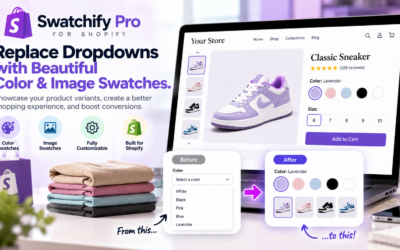
Swatchify takes the number-one position on our list because it is designed specifically to make Shopify product variants more visual and easier to navigate.
Rather than relying on basic variant dropdowns, merchants can use Swatchify to display color swatches and image swatches directly on their storefront.
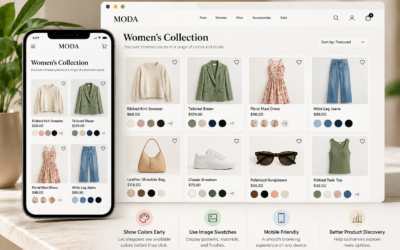
One major advantage is flexibility. Swatches can be used where shoppers actually need them, including product and collection pages. This allows customers to discover available colors and styles earlier in their shopping journey.
Why We Put Swatchify at #1
- Color swatches: Turn standard color options into visual, clickable selections.
- Image swatches: Use images for patterns, materials, styles, finishes, and other variants that cannot be represented accurately by a single color.
- Product and collection page support: Give customers access to variant choices while browsing products and collections.
- Variant image functionality: Help shoppers visually connect their selected variant with the appropriate product imagery.
- Cross-product linking: Connect related products and provide shoppers with another way to move between available choices.
- Inventory-aware options: Make product availability easier to communicate through the variant-selection experience.
- Customizable appearance: Adjust the presentation of swatches to better match the design of your Shopify store.
- Multi-language support: Useful for merchants selling to customers across different markets.
Another reason Swatchify stands out is that it focuses on the shopping experience rather than simply adding colored circles to a product page. The goal is to make variant selection more visual throughout the storefront.
Want to try it on your Shopify store?
Download Swatchify from the Shopify App Store
2. Color Swatch King: Variants
Color Swatch King is another established option for merchants searching for a Shopify variant swatch app. It supports visual variant options and is particularly notable for its long track record in the Shopify App Store.
The app can display swatches on product and collection pages, making it suitable for merchants who want shoppers to see available product choices before opening an individual product.
Its large review history also makes it one of the more established choices in the swatch category.
3. GLO Color Swatch Variant Image
GLO Color Swatch Variant Image is another popular option for displaying product variations visually. The app supports color and image-based selections and can be useful for stores that want visual variant selectors without relying solely on Shopify’s standard dropdown interface.
GLO also offers collection-page swatches, allowing shoppers to discover product options while browsing a catalog.
4. OP Color Swatch Variant Images
OP Color Swatch Variant Images combines swatches with variant image functionality. This makes it particularly relevant for products where customers need to see how a selected color or style changes the appearance of the product.
It supports swatches on product and collection pages and provides another alternative for merchants with visually complex catalogs.
5. Rubik Variant Images & Swatch
Rubik Variant Images & Swatch takes a somewhat more image-focused approach. Its features are designed for merchants who want stronger control over the images associated with individual product variants.
This can be valuable for stores where each color or style has multiple associated product photos and the image gallery needs to change according to the customer’s selection.
What Should You Look for in a Shopify Swatch App?
The best Shopify swatch apps should do more than replace text with colored buttons. A good solution should improve how customers discover, compare, and select product variants.
Before installing an app, consider whether it provides the following:
- Color swatches
- Image swatches
- Product page integration
- Collection page integration
- Variant image switching
- Customizable swatch designs
- Mobile-friendly controls
- Inventory handling
- Support for your Shopify theme
The importance of each feature depends on what you sell. A clothing store may prioritize colors and collection-page swatches, while a furniture store might need detailed image swatches for fabrics, finishes, and materials.
Color Swatches vs. Image Swatches
Color swatches work well when a product option can be accurately represented by a simple color. Black, white, red, blue, and green are obvious examples.
Image swatches become more useful when the difference is visual but more complex. Wood grain, fabric patterns, marble finishes, hair colors, prints, and multicolor designs are difficult to represent with a single colored circle.
For that reason, stores with diverse product catalogs may benefit from a Shopify swatch app that supports both color and image swatches.
Do You Need a Shopify Variant Swatch App?
Not every Shopify store needs an additional app. Shopify themes can support native swatch functionality in certain configurations.
However, merchants often look for dedicated swatch apps when they need greater control over appearance, image variants, collection-page swatches, linked products, or other functionality beyond a basic variant picker.
A dedicated app can also make managing a large number of visual product options easier than developing and maintaining custom theme code.
Why We Recommend Swatchify
Each app on this list serves a slightly different type of Shopify store. Nevertheless, we place Swatchify first for merchants looking for a focused combination of color swatches, image swatches, product and collection page functionality, variant imagery, and additional storefront features.
It is especially appealing for merchants who want to make product variants more visual without turning variant selection into an overly complicated part of the storefront.
Ultimately, the best way to determine whether a swatch app works for your store is to test it with your own products, theme, images, and variants.
Install Swatchify from the Shopify App Store and see how visual swatches work with your products.
Frequently Asked Questions
What is a Shopify swatch app?
A Shopify swatch app turns product options such as colors, patterns, styles, and finishes into visual selectors. Customers can click a color or image instead of choosing an option from a traditional dropdown menu.
What is the best Shopify swatch app?
The right app depends on the features your store requires. Swatchify is our top choice for merchants looking for a combination of color swatches, image swatches, product and collection page support, and additional visual variant features.
Can Shopify swatches appear on collection pages?
Yes. Several Shopify swatch apps support collection-page swatches, including Swatchify. This lets customers see available product options while browsing a collection rather than waiting until they open the product page.
Should I use color swatches or image swatches?
Use color swatches for simple colors and image swatches when a product option includes a pattern, texture, finish, material, or design that cannot be accurately represented with one color.
Where can I download Swatchify?
Swatchify is available through the Shopify App Store. Visit the Swatchify Shopify App Store listing to install the app.


0 Comments