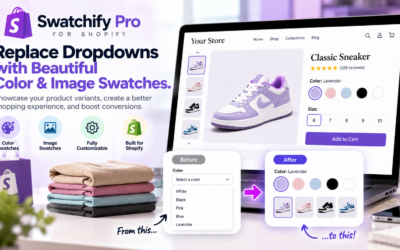
Instead of requiring customers to select a color name from a dropdown, visual swatches allow shoppers to see available colors, patterns, and product styles before making a purchase.
For Shopify stores selling clothing, accessories, furniture, beauty products, or home decor, this small design improvement can make product selection more intuitive.
In this guide, we’ll explore how Shopify color swatches and image swatches work, why they matter, and how merchants can use visual product options to improve their storefronts.
What Are Shopify Product Variant Swatches?
Shopify product variant swatches are visual selectors that represent different options available for a product. Rather than displaying every variation in a traditional dropdown menu, swatches present choices through colors, images, or other visual indicators.
For example, imagine a Shopify store selling a handbag in six colors. A traditional product page might display a dropdown containing Black, Brown, Beige, Red, Blue, and White.
However, a visual swatch selector can display six colored circles or product thumbnails. Consequently, customers can recognize available options without opening a dropdown menu.
This approach creates a more natural shopping experience, particularly for products where appearance plays an important role in purchasing decisions.
Common Types of Product Swatches
- Color swatches: Display available product colors using colored circles, squares, or other visual elements.
- Image swatches: Show actual product photographs representing different variations.
- Pattern swatches: Represent fabrics, textures, prints, and decorative designs.
- Style selectors: Help customers distinguish between different product styles or designs.
Although these options serve similar purposes, choosing the right swatch style depends on the products being sold and the information customers need.
Why Traditional Shopify Variant Dropdowns Can Limit the Shopping Experience
Traditional dropdown menus are functional, but they do not always provide the most intuitive way to display product variations.
For example, a shopper browsing a clothing store may want to compare several available colors. If those colors appear only as text, the customer must imagine how each option looks.
Additionally, dropdown menus can make it less convenient to compare multiple variations quickly.
Common Limitations of Dropdown Selectors
- Customers cannot immediately see all available colors.
- Product variations may be less noticeable.
- Comparing styles can require additional clicks.
- Color names may not accurately communicate appearance.
- Product pages may feel less visually engaging.
For instance, terms such as champagne, taupe, burgundy, and sage can represent slightly different shades depending on the product.
Therefore, displaying actual product images or accurate color samples can help customers understand what they are selecting.
How Shopify Color Swatches Improve Product Pages
Shopify color swatches allow merchants to represent product colors visually. As a result, shoppers can identify available choices without relying entirely on written descriptions.
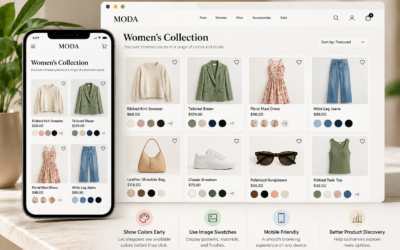
Consider a fashion store selling a sweater in eight colors. Rather than displaying a long dropdown menu, the store can present a row of clearly labeled color swatches beneath the product title.
Customers can then compare colors and select their preferred variation.
Benefits of Visual Color Selection
- Creates a cleaner product selection experience.
- Makes available colors easier to discover.
- Helps customers compare options quickly.
- Supports a more polished storefront appearance.
- Reduces ambiguity associated with color names.
Furthermore, visual swatches can be especially useful on mobile devices, where screen space and navigation simplicity are important.
However, merchants should also include readable labels so customers who cannot distinguish certain colors can still identify their options.
Shopify Image Swatches: Show Customers What They Are Buying
While color swatches are useful, some products require more detailed visual representations.
For example, furniture, handbags, shoes, and patterned clothing may have variations that cannot be adequately represented by a single solid color.
In these situations, Shopify image swatches can provide a more informative shopping experience.
Instead of displaying a plain brown circle for a leather handbag, an image swatch can show a thumbnail of the actual brown handbag.
Consequently, customers can compare colors, textures, patterns, and other visible differences.
Products That Benefit From Image Swatches
- Clothing with different patterns or prints
- Handbags available in multiple materials
- Shoes with different color combinations
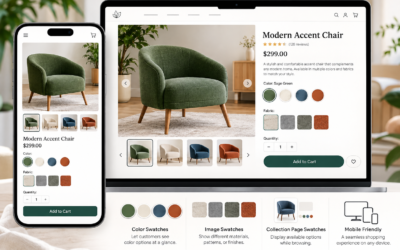
- Furniture with fabric or upholstery variations
- Home decor with different finishes
- Beauty products with multiple shades
- Accessories with different designs
Additionally, accurate image swatches can help customers develop more realistic expectations about product appearance.
Nevertheless, merchants should use consistent lighting and product photography whenever possible. Otherwise, inconsistent images may make product comparisons more difficult.
How Product Variant Swatches Can Support Shopify Conversions
Improving the customer experience is an important part of ecommerce conversion optimization.
Although product swatches do not guarantee higher sales, they can address several sources of friction during the shopping process.
Make Product Options Easier to Discover
Customers may overlook additional colors or styles when variations are hidden inside dropdown menus.
By presenting options visually, merchants can make those variations more noticeable.
Reduce Unnecessary Product Selection Steps
Visual selectors can make it easier to move between product variations. Consequently, customers may spend less time navigating menus and more time evaluating products.
Improve Customer Confidence
When shoppers can clearly see the variation they are selecting, they may feel more confident about their choice.
However, product descriptions, accurate images, sizing information, and return policies remain important parts of the purchasing experience.
Create a More Professional Storefront
Consistent visual selectors can contribute to a polished product page design.
Furthermore, a cohesive presentation helps merchants maintain a recognizable shopping experience across different product categories.
Choosing the Right Shopify Product Variant Selector
Not every Shopify store requires the same product variant selector. Therefore, merchants should choose a design that matches their products and customer expectations.
| Product Type | Recommended Selector | Primary Benefit |
|---|---|---|
| Basic clothing colors | Color swatches | Quick color comparison |
| Patterned clothing | Image swatches | Visual pattern identification |
| Handbags and shoes | Product image swatches | Clear variation previews |
| Furniture and upholstery | Texture or image swatches | Material and finish comparison |
| Beauty products | Color or shade swatches | Shade identification |
| Product sizes | Labeled buttons | Clear size selection |
Ultimately, the best selector is the one that communicates product differences clearly and remains easy to use.
Best Practices for Shopify Product Customization
Visual swatches can improve product presentation, but thoughtful implementation is essential.
When planning Shopify product customization, merchants should focus on usability, accuracy, and consistency.
Use Accurate Colors and Product Images
First, ensure that each swatch accurately represents the corresponding product variation.
For example, a dark green product should not be represented by a bright green swatch. Otherwise, customers may misunderstand what they are purchasing.
Clearly Indicate the Selected Variation
Next, make the selected option easy to identify through a visible border, checkmark, or another clear indicator.
Additionally, display the selected color or variation name when appropriate.
Make Swatches Mobile-Friendly
Because many customers shop on smartphones, swatches should be large enough to tap comfortably.
Furthermore, spacing between options should reduce accidental selections.
Include Accessible Labels
Do not rely exclusively on color to communicate important information.
Instead, provide descriptive labels and ensure customers can use the selector with keyboard navigation and assistive technologies.
Handle Unavailable Variations Clearly
If a product variation is unavailable, communicate its status clearly rather than allowing customers to select an option they cannot purchase.
Consequently, shoppers can better understand which choices are currently available.
Maintain Consistent Styling
Finally, use consistent swatch shapes, sizes, borders, and spacing throughout your storefront.
A unified design can help create a more professional and predictable shopping experience.
Using a Shopify Swatch App to Improve Product Presentation
Although some Shopify themes include native variant presentation options, merchants may want additional control over how product variations appear.
A dedicated Shopify swatch app can be worth evaluating when a store needs visual selectors beyond those supported by its existing theme.
For example, a merchant may want to replace traditional color dropdowns with more visually descriptive options.
Before choosing an app, consider whether it supports the features your store needs, works with your current Shopify theme, and maintains a consistent shopping experience across desktop and mobile devices.
Introducing Swatchify Pro
Swatchify Pro is a product-variant swatch solution for Shopify merchants looking to improve the visual presentation of product options.
For stores where product appearance influences purchasing decisions, a swatch-based presentation can make colors and styles easier for customers to explore.
Rather than treating variant selection as a purely technical step, merchants can use visual product options as part of their overall storefront design.
Visit Swatchify Pro to explore the product and its current features.
How to Evaluate the Performance of Product Swatches
After introducing visual swatches, merchants should evaluate whether the new presentation improves the shopping experience.
Rather than assuming that a design change automatically increases conversions, use store analytics and customer feedback to assess performance.
Metrics Worth Monitoring
- Product page conversion rate
- Add-to-cart rate
- Product variant selection activity
- Mobile shopping performance
- Customer questions about product variations
- Product returns related to incorrect variation selection
Additionally, merchants can conduct controlled tests when sufficient traffic is available.
For instance, comparing a traditional dropdown selector with a visual swatch selector may reveal which experience performs better for a particular product category.
However, reliable testing requires consistent measurement and enough data to distinguish meaningful differences from random variation.
Common Shopify Product Swatch Mistakes to Avoid
Even attractive swatches can create usability problems when implemented incorrectly.
Fortunately, many common issues can be avoided through careful design and testing.
- Inaccurate colors: Swatches that do not match the actual product can confuse shoppers.
- Missing labels: Customers may struggle to identify variations without descriptive text.
- Small touch targets: Tiny swatches can be difficult to select on mobile devices.
- Inconsistent product images: Poor photography can make comparisons less reliable.
- Unclear selection states: Customers should always know which variation is selected.
- Unavailable options: Out-of-stock variations should be clearly identified.
- Theme compatibility issues: Swatches should be tested with the storefront’s existing design and functionality.
For additional guidance on Shopify product variations, review the official Shopify product variants documentation.
Furthermore, the W3C Web Accessibility Initiative provides useful resources for designing accessible website interactions.
Frequently Asked Questions About Shopify Product Variant Swatches
What are Shopify product variant swatches?
Shopify product variant swatches are visual selectors that allow customers to choose product options through colors, images, or other visual indicators instead of relying exclusively on dropdown menus.
Can I replace Shopify dropdown menus with color swatches?
Yes. Depending on your Shopify theme and installed applications, you may be able to display product colors as visual swatches rather than traditional dropdown menus.
What is the difference between color swatches and image swatches?
Color swatches represent variations using solid colors, while image swatches use product photographs or other images. Consequently, image swatches may be more useful for patterns, textures, and complex product designs.
Do Shopify product swatches improve conversion rates?
Product swatches can make variation selection easier and improve product presentation. However, conversion improvements are not guaranteed and should be evaluated through analytics or controlled testing.
Are Shopify color swatches useful for mobile shoppers?
Yes. Properly designed color swatches can make product options easier to browse on smartphones. Nevertheless, they should have appropriate spacing, readable labels, and accessible selection indicators.
What types of stores benefit from image swatches?
Fashion, furniture, accessories, beauty, and home decor stores often benefit from image swatches because customers frequently compare visual differences between product variations.
Do all Shopify themes support product swatches?
No. Swatch functionality varies between Shopify themes. Some themes provide built-in options, while others may require additional customization or a compatible application.
What should I look for in a Shopify swatch app?
Look for compatibility with your theme, clear product variant presentation, mobile usability, accessible controls, and customization options that fit your storefront’s design.
Final Thoughts: Make Shopify Product Selection More Visual
A successful ecommerce store should make shopping as straightforward as possible. Although product photography, descriptions, and pricing remain important, the way customers select variations also contributes to the overall experience.
By implementing Shopify product variant swatches, merchants can replace less descriptive selection methods with visual options that help customers explore available colors and styles.
Furthermore, thoughtful swatch design can support a more consistent, attractive, and user-friendly storefront.
Whether your Shopify store sells clothing, handbags, furniture, beauty products, or accessories, visual product selectors may be a valuable improvement to consider.
Ready to improve how customers explore product variations?
Discover Swatchify Pro and explore ways to create a more visual Shopify shopping experience.

0 Comments