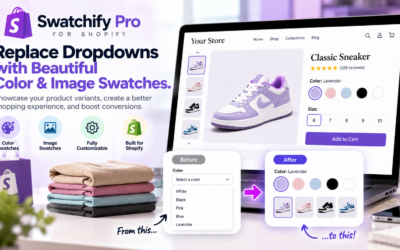
Swatchify Pro is a Shopify swatch app designed to help merchants replace traditional variant dropdowns with interactive color and image swatches. In addition to product page customization, eligible plans support collection page swatches, custom labels, and advanced product browsing features.
In this guide, we explain how Shopify collection page swatches work, why they matter, how to design effective product grid swatches, and how Swatchify Pro can help merchants showcase their product variations.
What Are Shopify Collection Page Swatches?
Shopify collection page swatches are visual indicators displayed alongside products in a collection grid. They show shoppers which colors, patterns, or other visual options are available before opening an individual product listing.
For example, a clothing store might display five color circles beneath a jacket in its winter collection. Similarly, a furniture retailer could use small image swatches to represent different upholstery finishes.
As a result, customers can discover product options earlier in the browsing process.
How Collection Page Swatches Differ From Product Page Swatches
Product page swatches help customers choose options after opening a specific product. Collection page swatches, meanwhile, introduce available variations while shoppers compare multiple products.
| Feature | Product Page Swatches | Collection Page Swatches |
|---|---|---|
| Location | Individual product details | Product grids and collections |
| Primary Purpose | Select a product variation | Discover available options |
| Shopping Stage | Product evaluation | Product discovery |
| Typical Appearance | Color or image selectors | Compact swatches near product cards |
| Main Benefit | Clearer variant selection | More informative browsing |
Both interfaces can complement one another when their designs remain consistent throughout the storefront.
Why Shopify Collection Page Color Swatches Matter
Many ecommerce shoppers compare several products before deciding which item to examine more closely. Therefore, the information available in a product grid can influence how efficiently customers browse.
Without visual options, a product card may show only one color even though the item is available in several alternatives.
For instance, a shopper who dislikes the displayed blue jacket might skip the listing without realizing that the same jacket is available in black.
Shopify collection page color swatches help communicate those additional choices.
Benefits of Collection Page Swatches
- Show available product colors earlier in the shopping journey.
- Help customers compare visual options across multiple listings.
- Reduce unnecessary navigation for basic product discovery.
- Make collection grids more informative.
- Encourage exploration of additional colors and styles.
- Support a consistent visual shopping experience.
However, the actual impact on sales depends on store design, product demand, pricing, and customer behavior. Visual swatches should improve usability rather than simply add decoration.
Shopify Color Swatches vs. Image Swatches on Collection Pages
Choosing between Shopify color swatches and Shopify image swatches depends on the products being sold.
Solid color swatches work well when a product variation can be accurately represented by a single color. Image swatches are more useful when customers need to see a pattern, material, or detailed finish.
When to Use Color Swatches
- Basic clothing colors
- Solid-color accessories
- Simple product finishes
- Products with clearly defined color options
For example, a T-shirt available in red, blue, white, and black can be represented through four recognizable color circles.
When to Use Image Swatches
- Patterned clothing
- Furniture upholstery
- Wood finishes
- Printed accessories
- Decorative materials
- Products with textured surfaces
For instance, a fabric with a detailed floral pattern cannot be represented accurately by a single solid color. Instead, an image swatch can show the actual pattern.
Consequently, the best Shopify variant selector is the one that communicates the product option most clearly.
How Shopify Product Grid Swatches Improve Product Discovery
Product discovery involves helping customers find merchandise that matches their preferences. Collection pages play an important role because they often display multiple products in a single browsing interface.
Shopify product grid swatches can add useful information to those listings without requiring merchants to create additional descriptive text for every variation.
Example: A Fashion Boutique
Imagine a boutique displaying 24 dresses in a seasonal collection. Several dresses are available in multiple colors, but each product card shows only one photograph.
Without collection page swatches, shoppers may need to open numerous listings to explore available colors.
By adding visual swatches, the boutique can show those choices directly beneath the product cards.
Example: A Furniture Store
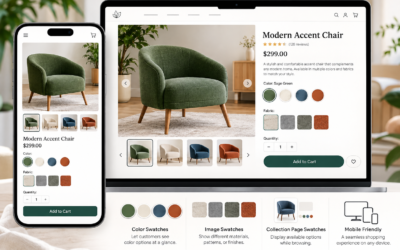
A furniture retailer might offer the same accent chair in several upholstery options.
Image swatches can help customers identify alternative materials while comparing furniture styles.
Furthermore, clearly labeled options can help distinguish similar finishes that might otherwise be difficult to recognize.
How to Customize Shopify Collection Page Swatches
Swatchify Pro offers collection page swatches and customization through its Pro and Enterprise plans. Merchants can use these features to create a product browsing experience that better complements their storefront design.
However, effective customization involves more than choosing attractive colors or shapes.
1. Choose Appropriate Swatch Sizes
Swatches should be large enough to recognize and select comfortably. Nevertheless, excessively large selectors can crowd product cards and reduce space for important information.
Therefore, choose dimensions that balance visibility with layout consistency.
2. Use Consistent Shapes
Circular swatches are common for colors, while square or rectangular options may work better for image previews.
Additionally, using consistent shapes across similar product categories can make browsing feel more organized.
3. Add Helpful Labels
Color names and tooltips provide useful context, especially when two options appear visually similar.
For example, labels such as “Sage Green,” “Olive,” and “Forest Green” help distinguish shades.
Swatchify Pro’s Pro plan includes custom swatch labels and tooltip information display.
4. Maintain Clear Selection States
When shoppers interact with swatches, the interface should clearly indicate which option is selected.
For instance, a visible outline or other selection indicator can reduce uncertainty.
However, selection indicators should not depend exclusively on subtle color differences.
Mobile-Friendly Shopify Collection Page Swatches
Mobile shoppers often browse products on smaller screens, making interface design particularly important.
Although collection page swatches can improve product discovery, crowded layouts may create problems when too many options appear beneath a product card.
Mobile Swatch Design Best Practices
- Provide adequate spacing between interactive options.
- Keep swatches recognizable at smaller sizes.
- Avoid obstructing product names and prices.
- Use accessible labels for color options.
- Clearly identify the selected variant.
- Test different mobile screen widths.
- Verify that product navigation remains easy.
Swatchify Pro provides mobile-responsive swatch functionality, while merchants should still test the final layout with their particular Shopify theme.
How to Add Collection Page Swatches to Shopify
Adding Shopify collection page swatches typically involves installing a compatible app, choosing a plan that supports collection displays, and configuring the swatch appearance.
Step 1: Review Your Product Options
Begin by checking that products have properly organized variants, descriptive option names, and suitable product images.
For example, a clothing product might have color and size options, while a furniture product may include fabric and finish variations.
Step 2: Install a Compatible Shopify Swatch App
Visit the Swatchify Pro Shopify App Store listing to review installation details and available plans.
Importantly, collection page swatches are included in the Pro and Enterprise plans, not the Free or Basic plans.
Step 3: Configure Your Collection Swatches
Use the app’s available settings to choose color or image swatches and customize their presentation.
Additionally, configure labels or tooltip information where supported.
Step 4: Check Your Shopify Theme
Preview collection pages to ensure the swatches appear appropriately within the theme’s product cards.
Because Shopify themes can use different layouts, compatibility and appearance should be verified before publishing changes.
Step 5: Test the Customer Experience
Finally, test collection browsing on desktop and mobile devices.
Confirm that swatches correspond to the intended products, that selections behave correctly, and that customers can navigate to the appropriate product information.
Advanced Shopify Collection Features With Swatchify Pro
Beyond basic collection page color swatches, Swatchify Pro provides additional functionality through its Enterprise plan.
Collection Page Quick View
Quick view functionality gives merchants an additional way to present product information during collection browsing.
For stores with large catalogs, a quick view modal can provide a convenient way to examine products without following the standard navigation path.
Advanced Swatch Layouts
Slider and carousel layouts can help organize larger groups of product options.
For example, a product with numerous finishes may benefit from a more compact presentation than a long row of swatches.
Cross-Product Linking
Some merchants sell related colors or designs as separate Shopify products rather than variants of one listing.
Cross-product linking can help customers navigate between those related products through swatch-based selections.
Sticky Add to Cart
Swatchify Pro’s Enterprise plan also includes a sticky add-to-cart button.
This feature is particularly relevant on product pages where customers may scroll through extensive information before purchasing.
Which Swatchify Pro Plan Includes Collection Page Swatches?
Swatchify Pro offers several plans with different capabilities. Therefore, merchants should select a subscription based on the features they actually need.
| Plan | Collection Page Swatches | Notable Features |
|---|---|---|
| Free | No | Product page color and image swatches |
| Basic | No | Product page swatches and priority support |
| Pro | Yes | Collection swatches, labels, tooltips |
| Enterprise | Yes | Pro features, quick view, advanced layouts, cross-product linking |
For current subscription prices and complete plan information, consult the official Swatchify Pro app listing.
Can Shopify Collection Page Swatches Increase Sales?
Shopify collection page swatches can improve the visibility of product options and make browsing more informative. However, no swatch app can guarantee higher sales or conversion rates.
Actual performance depends on product selection, website traffic, pricing, customer expectations, and the overall shopping experience.
For example, shoppers may discover more available colors after swatches are added. Nevertheless, that improvement in product discovery does not automatically mean more purchases.
Metrics to Evaluate After Adding Swatches
- Collection-to-product page click-through rates
- Product page engagement
- Add-to-cart rates
- Product conversion rates
- Mobile shopping behavior
- Customer questions about available variants
Additionally, merchants can use Shopify’s built-in analytics to review relevant store performance.
For more information, visit Shopify’s official reports and analytics documentation.
Common Mistakes to Avoid With Shopify Product Grid Swatches
Although visual selectors can improve a storefront, poor implementation may make shopping more difficult.
Using Inaccurate Colors
A swatch should represent the actual product as closely as possible. Otherwise, customers may develop incorrect expectations about the merchandise.
Displaying Too Many Options
Large numbers of swatches can overwhelm compact product cards. Therefore, merchants should consider whether a more organized layout would improve usability.
Ignoring Accessibility
Color alone should not be the only way to identify an option. Labels, selection indicators, and accessible interaction patterns help create a more inclusive shopping experience.
Failing to Test Mobile Layouts
Swatches that look attractive on desktop screens may be difficult to select on mobile devices.
Consequently, testing across screen sizes is an essential part of implementation.
Assuming Swatches Automatically Improve Conversions
Visual product options are a usability improvement, not a substitute for competitive pricing, trustworthy product information, or a reliable checkout experience.
Shopify Collection Page Swatches and Ecommerce SEO
Shopify collection page swatches primarily improve product presentation and navigation. They do not automatically increase organic search rankings.
However, well-organized collections and useful product information can support a better overall shopping experience.
For example, collection pages should include descriptive titles, relevant product groupings, accessible navigation, and useful content when appropriate.
SEO Best Practices for Shopify Collection Pages
- Write clear, descriptive collection titles.
- Use relevant keywords naturally.
- Provide useful collection descriptions.
- Maintain crawlable product links.
- Use descriptive product image alt text.
- Keep important product information accessible.
- Avoid unnecessary duplicate content.
- Monitor mobile usability and page performance.
For additional guidance about managing product options, consult Shopify’s product variant documentation.
Frequently Asked Questions About Shopify Collection Page Swatches
What are Shopify collection page swatches?
Shopify collection page swatches are visual color or image selectors displayed within product grids. They help customers discover available variations while browsing collections.
How do I show color swatches on Shopify collection pages?
You can use a compatible theme feature or install a Shopify swatch app that supports collection pages. Swatchify Pro includes collection page swatches in its Pro and Enterprise plans.
Can Shopify collection page swatches display product images?
Yes. Compatible swatch apps can use image-based selectors to represent patterns, finishes, and other visual product options.
What is the difference between color swatches and image swatches?
Color swatches represent options using solid colors, while image swatches display photographs or visual previews. Image swatches are often better for patterns and textured materials.
Does Swatchify Pro support collection page swatches?
Yes. Swatchify Pro offers collection page swatches and customization through its Pro and Enterprise plans.
Are Shopify collection page swatches mobile-friendly?
They can be. Swatchify Pro supports mobile-responsive swatch designs, although merchants should test their specific Shopify theme and product grid layout.
Can collection page swatches improve Shopify conversions?
They can make product variations easier to discover and compare. However, conversion improvements are not guaranteed and should be evaluated through store analytics.
Can Swatchify Pro connect related Shopify products?
Yes. The Enterprise plan includes cross-product linking, allowing merchants to connect related product listings through swatch-based navigation.
Do Shopify collection page swatches help SEO?
Swatches do not directly guarantee better search rankings. Nevertheless, clear product navigation and useful collection information can contribute to a better overall storefront experience.
Improve Shopify Collection Pages With Swatchify Pro
Shopify collection page swatches help merchants present product colors, patterns, and visual options earlier in the shopping journey. By making variations visible within product grids, stores can offer a more informative browsing experience.
Swatchify Pro provides customizable Shopify color swatches and image swatches for product pages, with collection page functionality available through its Pro and Enterprise plans.
For merchants seeking additional capabilities, advanced features include custom labels, tooltips, collection quick view, cross-product linking, and flexible swatch layouts.
Whether you sell apparel, furniture, cosmetics, accessories, or home decor, thoughtful product variant presentation can help customers explore merchandise more confidently.
Discover more about Swatchify Pro and its Shopify swatch features.
Ready to add visual product options to your Shopify store?
Install Swatchify Pro from the Shopify App Store and choose the plan that matches your store’s product and collection page requirements.


0 Comments